



Many mid-scale enterprises operating with an ERP system frequently encounter operational visibility constraints concerning user activities. Among the recurring challenges are management’s inability to ascertain precisely which users have logged into the system during both office hours and after-hours, alongside ambiguity regarding the individuals responsible for modifications to sensitive data.
When critical errors occur, management teams and IT administrators often find themselves at a loss when conducting internal audits, investigating human errors, or substantiating changes made to pivotal transactions—such as the alteration of nominal values or posting dates.
The absence of a valid and comprehensive audit trail renders enterprises vulnerable to risks of data manipulation and the deterioration of internal control frameworks.
SAP B1 Access Log serves as a tool to monitor user access history and login timestamps within the system, whereas SAP B1 Change Log functions to document every modification of data, values, and transactions executed by users.
Both features are instrumental in fortifying a robust Audit Trail SAP Business One, thereby enhancing data security, ensuring the precision of financial reporting, and reinforcing the efficacy of internal corporate controls.
What is the SAP B1 Access Log?
The SAP B1 Access Log is an intrinsic security mechanism embedded within SAP Business One that systematically archives the entire access history of users into the corporate database.
This feature operates autonomously in the background, recording authentication details each time a user attempts to log in or out of the ERP ecosystem.
Function and Working Principle
Conceptually, this tool documents the User Login History of SAP Business One by capturing digital parameters at the moment activities take place. Whenever a user account initiates a connection request to the database server, the system validates credentials and promptly registers the status within the system log tables.
Types of Recorded Activities
- Login Succeeded: Successful attempts by users to access the system.
- Login Failed: Unsuccessful access attempts (e.g., incorrect password entries), serving as vital indicators in the detection of potential intrusions.
- Logouts: The precise timestamps when users disconnect or exit the company database.
- Account Lock Status: Information pertaining to user accounts being locked due to repeated unsuccessful password submissions.
Primary Benefits
By leveraging this component, IT Managers and ERP Consultants can monitor user work patterns, detect suspicious activities beyond regular operational hours, and ensure adherence to account usage policies within the prescribed security perimeters of the enterprise.
What is the SAP B1 Change Log?
The SAP B1 Change Log is a historical data tracking module that meticulously records every modification, update, or deletion applied to master data and transactional documents within SAP Business One.
Whenever the *Update* button is triggered within an active window, the system locks the previous data state and generates a new encapsulated record.
Function and Adaptability
The principal function of this feature is to uphold Data Integrity. The system does not merely note that a document has been altered; it preserves the entire status of each field from the document prior to its modification. This enables authorized users to perform real-time comparisons across different versions.
Recordable Data Changes
- Master Data: Encompasses alterations to Item Master Data (e.g., changes in selling prices, inventory valuation methods) and *Business Partner Master Data* (e.g., adjustments to credit limits, bank account details, or payment terms).
- Marketing Documents: Modifications to statuses or quantities within sales and purchasing documents, including *Sales Orders*, *Purchase Orders*, *Goods Receipt PO (GRPO)*, and *A/R Invoices*.
- Financial & Inventory Documents: Tracking of revisions to *Journal Entries* prior to closing, *Inventory Transfer* schemes, and stock adjustments.
Connection to Audit Trail
This feature forms a cornerstone of the *Audit Trail SAP Business One*. With change logs chronologically organized by timestamps and user IDs, internal auditors can reconstruct transactions backward—from their current state to their original form. This minimizes the risks of financial statement manipulation and facilitates compliance with stringent financial regulatory standards.
What are the Differences Between Access Log and Change Log?
To provide enhanced transparency regarding Monitor User Activity in SAP Business One, the following comparative table delineates the distinctions between these two features:
| COMPONENT | SAP B1 ACCESS LOG | SAP B1 CHANGE LOG |
|---|---|---|
| Primary Purpose | To monitor user logins/logouts and safeguard the system’s perimeter security. | To trace mutations, corrections, and modification histories at the record level. |
| Data Recorded | User ID, Date, Login/Logout Times, Computer Name/IP Client, and Connection Status. | Document Version, Modified Field Names, Previous & Current Values, User ID, and Update Timestamp. |
| Usage Example | Verifying whether any unauthorized account attempted to log in at 2:00 AM. | Investigating who altered the credit limit of a vendor or customer. |
| Primary Stakeholders | IT Managers, Security Administrators, and System Auditors. | Finance Managers, Internal Auditors, Inventory Controllers, and Management. |
Why is User Activity Monitoring Crucial?
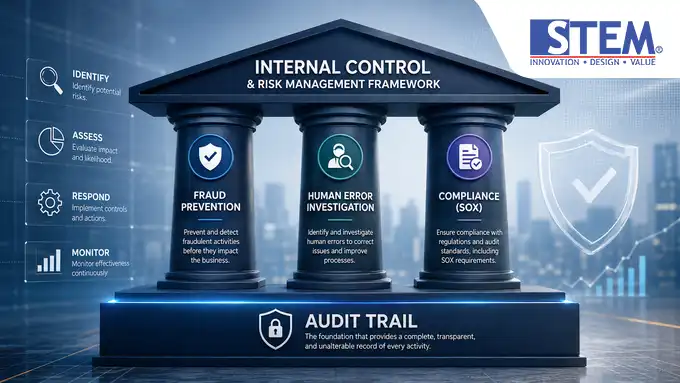
Implementing User Activity Monitoring in SAP B1 transcends mere technical options—it is a strategic imperative for modern corporate governance. Below are several pivotal factors underscoring the necessity of optimizing such surveillance:
- Fraud Prevention and Detection: Fictitious transactions or unilateral modifications to Business Partner bank accounts can be directly traced to the specific user ID responsible.
- Investigation of Human Errors: When inventory discrepancies arise from incorrect quantity entries in an *Inventory Transfer*, management can pinpoint the relevant user for retraining, thereby precluding unfounded accusations.
- Audit Readiness and Compliance: For enterprises bound by stringent regulations such as the Sarbanes-Oxley Act or external audits, the availability of immutable logs is a prerequisite for successful IT governance assessments.
- Strengthened Internal Controls: Activity logs serve as a counterbalance to *User Authorization* and *Approval Processes*. While authorization delineates access boundaries at the outset, logs verify adherence to these boundaries post-execution.
- Segregation of Duties (SoD): Ensures users do not exploit overlapping authorities and detects anomalies in the execution of critical financial documents, such as direct postings to the General Ledger.
How to Utilize Access Log and Change Log in SAP Business One?
Conceptually, these features can be accessed directly via the SAP Business One graphical user interface by personnel holding administrator or audit privileges.
Operating the Access Log
- Navigate to the system’s primary administration module.
- Open the utility menu that governs user access history (*Access Log*).
- Define search filters based on specific date ranges or specific user names.
- The system will then display a chronological list of login activities, complete with originating computer information and status outcomes.
Operating the Change Log
- Open the transaction document or master data record to be examined (e.g., the *Item Master Data* or *Sales Order* screen).
- Within the upper menu bar, select the *Tools* option, then click *Change Log*.
- A new window will emerge, presenting a comprehensive list of all modification versions pertaining to that document.
- Select two differing versions, then click the Show Differences button to specifically view which fields have experienced value changes (visually highlighted by the system).
Real-World Case Studies
Case 1: Unilateral Selling Price Alteration
- Situation: The profitability of a particular product declined as it was sold below its standard price within a *Sales Order* document.
- Resolution: By opening the said *Sales Order* and examining its *Change Log*, the Finance Manager could view the document’s version prior to its last save. The system revealed that “Sales_Staff3” altered the *Price* field from Rp500,000 to Rp400,000 at 2:15 PM WIB.
Case 2: Unauthorized Credit Limit Increase
- Situation: A customer with a poor credit history unexpectedly managed to place a large order due to an elevated credit limit.
- Resolution: The auditor accessed the *Business Partner Master Data* for that customer, invoked the *Change Log* function, and discovered that the account “Credit_Controller1” had raised the credit limit by 50% without following the official *Approval Process* a day prior to the transaction.
Best Practices for Monitoring User Activity
To ensure these oversight instruments function optimally for enterprise risk mitigation, consider implementing the following best practices:
- Conduct Periodic Log Reviews: Schedule regular examinations (e.g., weekly) by IT Auditors or Managers to identify anomaly trends.
- Enforce Stringent User Authorization: Adhere to the *Least Privilege* principle—ensure users possess access solely to the modules essential for their job descriptions.
- Integrate with Approval Processes: For high-value transactions or critical master data changes, mandate multi-level approvals so that no individual can directly execute data updates without oversight.
- Closely Monitor Master Data Changes: Continuously oversee alterations to *Item Master Data* and *Business Partner Master Data*, as errors or manipulation in these areas have systemic repercussions on *Inventory* modules and financial statements.
- Document and Backup Audit Results: Ensure that system logs are incorporated into the company’s regular database backup scheme to prevent loss of historical data during server maintenance.
Common Oversights
Despite the system’s robust audit protections, its effectiveness is often undermined by the following operational lapses:
- Use of Shared Accounts: Multiple staff members utilizing a single user account (e.g., “Manager” or “Admin”) interchangeably, thereby rendering logs devoid of accountability as the actual identity of the physical user cannot be validated.
- Excessively Broad Authorization: Granting superuser-level access to ordinary operational staff, enabling them to modify foundational system configurations that compromise logging schemas.
- Unreviewed Logs: Treating logging features as mere technical appendages that accumulate untouched in the database until data breaches or fraud incidents occur.
- Disregarding Change Procedures: Allowing staff to directly modify price parameters or vendor data via verbal communication without documented evidence or digital verification within the ERP.
FAQ (Frequently Asked Questions)
1. What is the principal distinction between the Access Log and Change Log in SAP Business One?
The Access Log chronicles users’ login and logout histories, whereas the Change Log documents the historical sequence of data value changes or document modifications occurring within the database.
2. Can the history of all data changes in SAP Business One be viewed?
Yes, nearly all critical master data entities and marketing documents possess built-in Change Log functionality that automatically records instances when users press the *Update* button.
3. Does SAP Business One retain change history permanently?
The system retains change histories within dedicated log tables for as long as the database remains active and no manual data cleansing or database compression is executed by administrators.
4. How can one determine who altered the price of an item?
Open the *Item Master Data* window for the respective item, then access *Tools* > *Change Log*. Select the most recent version and compare it with the previous one using the *Show Differences* feature to identify the *User ID* responsible and the associated modification timestamp.
5. Can failed login attempts be monitored?
Yes, through the *SAP B1 Access Log*, IT Administrators can review login statuses, including failure indications (e.g., *Login Failed*), to detect signs of brute-force account breach attempts.
6. How can user security and audit accuracy be enhanced in SAP Business One?
Implement a strict one-user-one-account policy (no shared accounts), restrict access rights through *User Authorization*, activate *Approval Templates* for critical transactions, and conduct periodic audits of stored activity logs.
Conclusion
The optimization of SAP B1 Access Log and SAP B1 Change Log constitutes a tangible stride toward establishing a transparent, accountable, and secure corporate governance framework.
From a business perspective, comprehensive visibility into User Activity Monitoring in SAP B1 mitigates financial risks stemming from operational errors and internal fraudulent acts.
By grasping the operational mechanics of these tracking mechanisms, management can ascertain that every figure presented in financial reports is substantiated by a valid, fully accountable audit trail.
Explore further aspects of system security control by delving into comprehensive guides on ERP system management, database protection, and technology-driven operational governance available in our other technical reference articles.
Let us engage in a discussion regarding the reinforcement of your internal controls, security design schemas, and audit trail preparedness with our team of expert consultants.