


Many mid-scale enterprises frequently encounter operational bottlenecks originating from poor master data management. Common recurring issues include inconsistent customer data creation, the emergence of duplicate vendor records that confuse procurement teams, non-uniform payment term determinations across departments, and frequently changing billing (Bill To) and shipping (Ship To) addresses without a clear audit trail.
Consequently, accounts receivable aging (A/R Aging) and accounts payable aging (A/P Aging) reports become unreliable, financial reconciliation is impeded, and master data itself transforms into a primary source of human error, thereby undermining overall business efficiency.
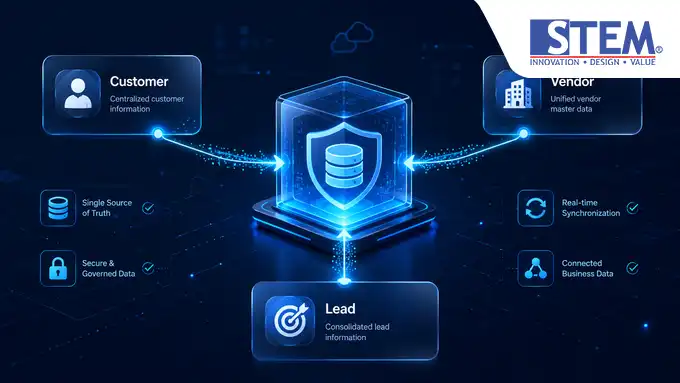
Business Partner Master Data in SAP Business One serves as a centralized repository that houses comprehensive information pertaining to customers, vendors, and leads, forming the foundational pillar for sales, purchasing, financial transactions, and CRM activities.
The integration of this master data ensures that every document flow consistently utilizes accurate, valid, and dependable information, thereby generating reliable accounting records and financial statements across all ERP modules.
What Is Business Partner Master Data?
Within the ERP system architecture, Business Partner Master Data in SAP Business One constitutes the core entity used to record and manage the complete profiles of all external parties transacting with the enterprise.
Unlike conventional retail or accounting applications that rigidly segregate supplier and customer databases, SAP Business One Business Partner consolidates all these categories into a single logical menu under the Business Partner module.
Within the Business Partner Master Data Window, users can perform operational activities such as Adding New Business Partner and conducting periodic data maintenance through the Displaying & Updating Business Partner functions.
Every modification executed by a user is automatically recorded by the system, thereby ensuring full accountability and comprehensive audit traceability.
Why Does Business Partner Serve as the Cornerstone of All SAP Business One Transactions?
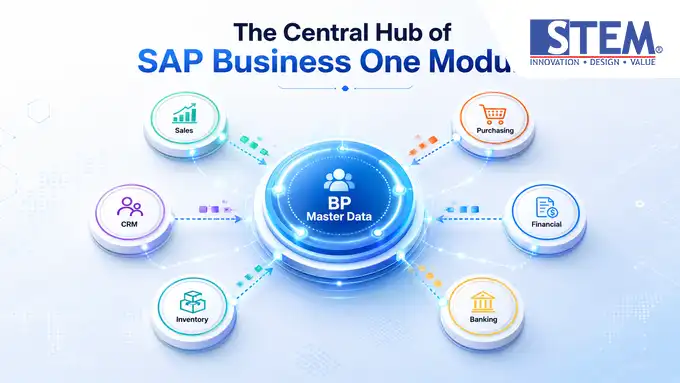
Every business activity within an enterprise invariably entails interaction with external parties. Consequently, this Master Data in SAP B1 is architected to directly interface with nearly all core system modules:
1. Sales & CRM Module:
Leverages Lead and Customer data to initiate Sales Quotations, secure commitments through Sales Orders, and monitor Credit Limits when sales administration staff issue Delivery and A/R Invoice documents.
2. Purchasing Module:
Utilizes Vendor data to process Purchase Orders, execute goods receipt at warehouses via Goods Receipt PO (GRPO), and record financial obligations through A/P Invoices.
3. Inventory Module:
Ensures that Shipping Type determination and default Warehouse mapping are seamlessly aligned with the operational physical locations of the relevant Business Partner.
4. Financial & Banking Module:
Automatically links logistical transactions to the appropriate Control Accounts within the Chart of Accounts. This guarantees that every Incoming Payment and Outgoing Payment instantaneously updates Customer Balances or Vendor Balances and generates corresponding Journal Entries to G/L Accounts in real-time.
Structure of Business Partner Master Data
Information management within the Business Partner Master Data Window is segmented into several dedicated tabs to facilitate the logical grouping of logistical, financial, and administrative data. Below is the functional structure of these primary tabs:
| TAB / SECTION NAME | PRIMARY FUNCTION & CRITICAL DATA ELEMENTS | SYSTEMIC IMPACT & ERP INTEGRATION |
|---|---|---|
| Header Area | Defines the BP Code, BP Name, type (Group), Currency, and tax identification number (Tax ID / NPWP). | Determines the primary classification of the entity and permitted currencies in marketing documents. |
| General Tab | Manages foundational information such as Sales Employee name, Shipping Type, language preference, and BP active/inactive status. | Influences sales commission calculations, default logistical route determination, and data access authorization controls. |
| Contact Person | Stores individual names, phone numbers, email addresses, positions, and personal contact details of external parties. | Automatically utilized in email document dispatches, Activity scheduling, and the CRM module. |
| Address Tab | Segregates billing (Bill To) and shipping (Ship To) addresses in a multi-address format. | Directs tax reporting (Business Place) via Bill To and physical goods allocation via Ship To. |
| Payment Terms | Governs payment terms, Credit Limits, commitment ceilings, and agreed-upon cash discounts. | Determines automatic invoice due dates and triggers Approval Templates if credit limits are breached. |
| Accounting Tab | Maps Control Accounts, default Tax Codes, and financial consolidation methods. | Dictates which G/L Accounts are automatically affected during Journal Entry postings. |
| Properties | Provides 64 customizable boolean indicators (Y/N) for advanced marketing or internal reporting classifications. | Enables flexible data analysis within Sales Analysis or Purchase Analysis menus. |
| Remarks & Attachments | Stores additional free-text notes and attachments of legal documents (e.g., PKP, NIB, or ID cards). | Assists operational teams in reviewing the compliance history of legal files from respective business partners. |
Distinctions Among Customer, Vendor, and Lead
Within the Business Partner in SAP B1 architecture, external entities must be classified into one of three primary types to ensure the validity of document cycles:
| CHARACTERISTIC | LEAD | CUSTOMER | VENDOR |
|---|---|---|---|
| Definition | A potential customer still in the prospecting or preliminary negotiation phase. | An official customer fully authorized and prepared for commercial transactions. | A supplier of goods or service provider that invoices the company for payment. |
| Associated Modules | CRM, Sales | Sales, CRM, Inventory, Banking | Purchasing, Inventory, Banking |
| Document Validity Commencement | Sales Quotation, Sales Order | From Sales Quotation to Incoming Payment | From Purchase Order to Outgoing Payment |
| Logistical Document Boundaries | Cannot issue Delivery or A/R Invoice documents. | Can utilize the complete sales document cycle. | Can utilize the complete purchasing document cycle. |
| Financial Impact | Holds no account balance and triggers no journal postings. | Affects receivable balances (Customer Balance) and receivable control accounts. | Affects payable balances (Vendor Balance) and payable control accounts. |
| Conversion Process | Can be directly converted to Customer status without altering the BP code. | Final status for the sales cycle (cannot be reverted to Lead). | Fixed status for the procurement cycle (cannot be changed to other types). |
How Is Business Partner Utilized in the Document Flow?
The efficiency of the Document Flow in SAP Business One heavily relies on the readiness of data within the Business Partner Master Data. When a transaction document (Marketing Document) is created, the system dynamically pulls this master data to streamline document entry and minimize human error.
[Sales Cycle]: Lead/Customer -> Sales Quotation -> Sales Order -> Delivery -> A/R Invoice -> Incoming Payment [Purchasing Cycle]: Vendor -> Purchase Order -> GRPO -> A/P Invoice -> Outgoing Payment
1. Transaction Initiation (Quotation & Order):
Upon selecting a Business Partner code, the system automatically populates the entity name, currency, Sales Employee name, and the applicable Price List for the customer or as agreed with the vendor within the Item Master Data of SAP Business One.
2. Logistical Movement (Delivery & GRPO):
The shipping address (Ship To) specified in the address tab is automatically copied into logistical documents. Should a customer have stringent Credit Limit policies, the creation of new Delivery or Sales Order documents can be automatically blocked via the Approval Template in SAP Business One if the transaction value exceeds the credit ceiling.
3. Financial Recognition (A/R & A/P Invoice):
When an A/R Invoice or A/P Invoice is added, the system reads the control account determinations from the Accounting tab. It then autonomously posts the Journal Entry in SAP Business One to the respective trade receivables or payables accounts in the G/L Account, eliminating the need for manual intervention by accounting staff.
4. Account Settlement (Payments):
Incoming Payment or Outgoing Payment documents read the current outstanding balance (Customer/Vendor Balance) and cross-reference it with the Payment Terms in SAP Business One to validate whether any early payment discounts are eligible to be applied.
Frequent Issues Arising from Poor Business Partner Management
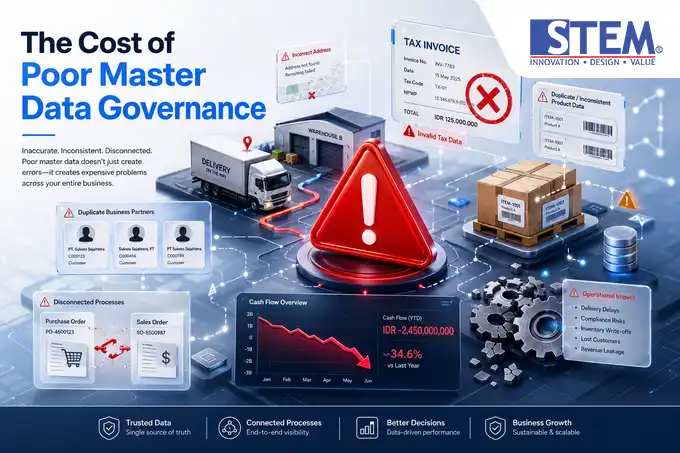
Neglecting master data governance will inevitably subject your enterprise to the following operational impediments:
- Defective Tax Invoice Issuance: Resulting from invalid NPWP/NIK numbers or Bill To addresses that do not align with DJP Indonesia registration data, culminating in sanctions or e-Faktur rejections.
- Misrouted Goods Deliveries: Warehouse teams dispatch products to incorrect addresses because the Ship To field is manually entered per transaction due to a lack of standardized address data in the master record.
- Cash Flow Leakage: Arising from inadvertent Credit Limit leniency when sales teams create new Customer codes for existing clients with accumulated outstanding receivables (concealed bad debts).
- Distorted A/R Aging Reports: Business performance analysis becomes biased as management cannot ascertain total real sales per business group due to fragmented customer data lacking clear relational links.
Best Practices for Managing Business Partner Master Data
To mitigate these operational risks, implement the following Data Governance Framework within your SAP Business One deployment:
1. Standardized Naming and Coding Conventions
Establish a consistent, unique code structure that systematically reflects entity classification. Avoid allowing users to generate codes arbitrarily.
- Domestic Customers:
C-DOM-00001,C-DOM-00002 - International Vendors:
V-INT-00001,V-INT-00002 - Leads/Prospects:
L-SBY-00001(Lead from Surabaya area)
2. Segmentation via Business Partner Groups
Leverage the Business Partner Group feature to categorize business partners based on geographic regions, industry types, or transaction volumes. This is crucial for executing efficient Sales Analysis and Purchase Analysis functions.
3. Rigorous Access Control (User Authorization)
Restrict the rights to create and modify master data. Grant Full Authorization exclusively to Master Data Administrators or Internal Control teams. Routine operational staff, such as sales or purchasing administrators, should be assigned Read Only access to safeguard data consistency against unintended alterations through the User Authorization configuration in SAP Business One.
4. Activation of Change Log Monitoring
Whenever critical information—such as vendor bank account numbers or customer credit limits—is modified, ensure the IT team utilizes the Business Partner Master Data Change Log or Access Log & Change Log in SAP Business One to view data comparisons (Before vs. After), complete with timestamp and the User ID of the executor.
Implementation Example in a Company
Case Study: PT Distribusi Utama Nusantara (an FMCG manufacturer based in Jakarta)
Condition Before Using SAP B1:
The company managed customer data using separate spreadsheets at each branch office. Frequently, the same customer was registered under three different names (PT. Maju Jaya, CV Maju Jaya, Maju Jaya Toko).
Consequently, the finance team misallocated credit limits, goods deliveries were frequently interchanged between branches, and management struggled to discern the true total profitability of the store network.
Condition After Using SAP B1:
All business partner data was migrated into a single centralized database system using the Adding New Business Partner function with stringent naming rules. Multi-location addresses were meticulously organized within the Address tab.
The Credit Limit in SAP Business One configuration was activated and automatically linked to the invoicing system. As a result, misdelivery incidents plummeted by 95%, and the risk of uncollectible receivables was significantly curtailed, as the system automatically locks transactions once the credit limit is breached.
Common Mistakes in Business Partner Master Data Setup
Avoid these technical configuration errors during your ERP system go-live:
- Incorrect Currency Selection: Opting for Local Currency when the vendor is an international service provider invoicing in foreign currency (USD/SGD). Switch to All Currencies if the entity transacts in multiple currencies.
- Neglecting Control Account Linkage: Failing to scrutinize the mapping of trade receivables/payables control accounts in the Accounting tab, resulting in logistical transactions being posted to incorrect G/L accounts.
- Failing to Distinguish Bill To and Ship To: Populating identical address lines for both billing and shipping, despite many corporations having administrative headquarters (billing) located far from their operational warehouses (goods receipt).
- Omitting Default Tax Code Assignment: Failing to associate the relevant Tax Code (e.g., 11% VAT or applicable income tax articles) in the master data, forcing administrative staff to manually select tax codes for each transaction document line.
FAQ (Frequently Asked Questions)
1. Can a Lead status be directly changed to Customer in SAP Business One?
Yes, a Lead can be directly converted to a Customer through the Business Partner Master Data Window. Simply change the type dropdown from “Lead” to “Customer” and click Update. All historical Sales Quotation or Sales Order documents created while it was a Lead will remain perfectly intact without disruption.
2. Can a Business Partner Code (BP Code) already used in transactions be changed or deleted?
A BP Code with existing transaction history (Marketing Documents or Journal Entries) cannot be deleted from the database to uphold Audit Trail integrity. However, if no longer active, you can change its status to Inactive in the General Tab so it no longer appears in new transaction searches.
3. How do we handle an entity that acts as both a Customer and a Vendor?
In SAP Business One, you must create two distinct Business Partner Master Data numbers: one of type Customer and one of type Vendor. However, to consolidate their receivables and payables balances, you can link the two codes via the Connected Business Partner feature in the Accounting tab.
4. Where do we set the maximum Credit Limit for a Customer?
The credit limit is configured in the Payment Terms tab within the Credit Limit field. The value entered here serves as the reference for the system to perform automatic validations during logistical document creation.
5. Can we store more than one shipping address for a single Customer?
Yes. Within the Address tab, you can add multiple shipping address (Ship To) lines by assigning a unique ID to each address (e.g., Gudang-Jakarta, Gudang-Surabaya, Toko-Bandung).
6. What is the function of Control Account mapping in the Accounting tab?
The Control Account serves as an automatic bridge between operational modules (Sales/Purchasing) and the Financial module. This account ensures that the total sub-ledger balances for receivables or payables are always automatically synchronized with the primary G/L Account in the balance sheet.
7. Why can’t a transaction document be added, and why does it show a “Credit Limit Exceeded” message?
This message appears because the current transaction value, when added to the existing receivable balance of that Customer, has surpassed the maximum Credit Limit set in the Payment Terms tab. Managerial Approval from the finance manager is required to release the document if configured via the Approval Template in SAP Business One.
8. How can we view the audit trail of changes made to address or phone number in Master Data?
Navigate to the main menu, select the business partner document you wish to inspect, and click Tools > Change Log in the top navigation bar to access the complete data modification history.
Key Takeaways
- Integrated Information Hub: Business Partner Master Data manages crucial information for customers, vendors, and leads within a singular, unified platform.
- Driver of Journal Automation: Accurate control account configuration in the Accounting tab eliminates the need for manual journal entries during commercial transactions.
- Key to Financial Risk Control: The Credit Limit feature in the Payment Terms tab acts as the primary defense mechanism to prevent bad debts.
- Upholding Operational Data Validity: Consistent naming governance, restricted authorization access, and the utilization of Change Logs are fundamental pillars for long-term implementation success.
Conclusion
The management of Business Partner Master Data in SAP Business One transcends mere data entry administration; it is a strategic foundation that determines the health of your accounting information system and the seamless operation of your supply chain.
With a well-structured data framework adhering to official SAP Portal documentation standards and the implementation of best governance practices in Indonesia, your enterprise can eliminate human error, accelerate cross-departmental workflows, and generate accurate financial reports to support swift and precise business decision-making.
Is your company still grappling with duplicate vendor data or uncontrolled customer receivables? Contact our functional consultant team today to obtain a master data governance audit and optimization for your SAP Business One system.