


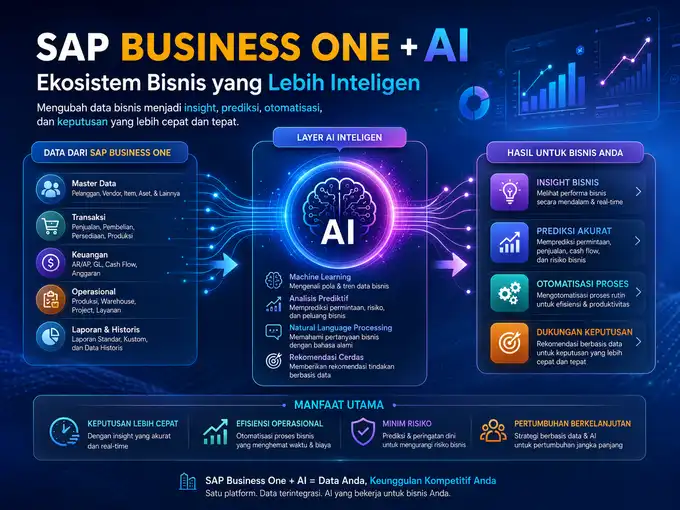
If your company has been running SAP Business One for several years, there is a good chance your system stores thousands to millions of rows of data: Sales Orders, A/R Invoices, Purchase Orders, Journal Entries, all the way to complete Business Partner histories. The problem is, having a lot of data does not automatically translate into better decisions.
Some common symptoms that often appear in companies using SAP Business One:
- Reports are already available in the system, but they still have to be downloaded and analyzed manually in Excel at the end of each month.
- Vendor invoices are still retyped one by one into A/P Invoices.
- The sales team only realizes that there are Sales Orders that are potentially going to be delayed after the customer complains.
- Finance staff spend time on repetitive tasks that could actually be accelerated.
- Management needs quick answers (“What is the cash flow trend for the next three months?”), but the answer can only be obtained after the reports are reorganized.
- Small anomalies in transactions — for example, unusual payment patterns — are often missed through manual observation because the transaction volume is too large.
This is where Artificial Intelligence (AI) starts to become relevant to discuss alongside SAP Business One. However, before going any further, one thing needs to be clarified: AI is not a magic button that automatically becomes active as soon as SAP Business One is installed.
AI is a capability layer that works on top of the data and processes already available in SAP Business One — and how it is activated varies depending on the selected use case.
SAP Business One and AI are connected through the structured data and business processes within the ERP — from Sales Orders and invoices to inventory data. AI can be used to extract information from documents, analyze data, detect anomalies, and support business predictions.
Some of these capabilities are already integrated into the SAP Business One core (for example, Document Information Extraction), while other capabilities require SAP AI Business Services, SAP Build Process Automation, SAP Business Technology Platform, partner add-ons, or external integrations.
What Is Artificial Intelligence in the Context of SAP Business One?
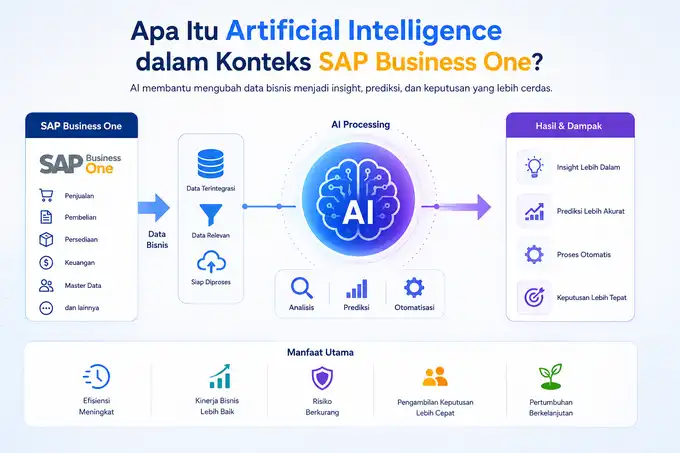
Before discussing implementation, it is worth establishing a common understanding of the terminology. In the SAP ecosystem, several of these terms are often confused even though they have different meanings:
- Artificial Intelligence (AI) — the ability of a system to imitate some aspects of human cognition, such as recognizing patterns, reading documents, or making predictions based on historical data.
- Machine Learning (ML) — a branch of AI in which models “learn” from data to recognize patterns, such as recognizing invoice structures from various vendors without manually written rules for each one.
- Generative AI — a category of AI that can generate new content, such as text responses to natural language questions, report summaries, or communication drafts.
- Automation (including RPA) — automatically executing repetitive work steps based on predefined rules. Automation does not always use AI; much automation is purely rule-based.
- Analytics / Business Intelligence (BI) — processing historical data into reports, dashboards, and visualizations to help people understand business conditions.
The fundamental difference is: automation performs tasks, BI presents data, while AI adds a layer of “understanding” or “prediction” on top of that data.
The three complement each other rather than replace one another — and all three can be present together in a single SAP Business One process, for example when an invoice is extracted by AI, then processed further by automation, and finally the results are visualized through BI.
Does SAP Business One Already Use AI?
The objective answer is: partially, and at different levels. Based on SAP Community publications regarding SAP Business One and intelligent technologies, SAP places these initiatives into three priority areas with different levels of integration:
Capabilities that are part of the SAP Business One core.
Since certain Feature Packs, SAP Business One has integrated Document Information Extraction services directly into the core system to support document reading processes within the Order to Cash and Procure to Pay flows. This is a case where intelligent technology is already integrated into the product.
Capabilities available through SAP Intelligent RPA / SAP Build Process Automation.
These automation bots can be combined with intelligent technology services to execute cross-application processes, but their status is that of separate automation services connected to SAP Business One, rather than built-in features within the SAP Business One client itself.
Capabilities opened to partners and add-ons.
SAP explicitly directs the use of SAP AI Business Services — a collection of services such as Document Information Extraction, Document Classification, and Data Attribute Recommendation — as a foundation that SAP Business One partners can use to build their own AI add-ons, rather than as features that are automatically activated for all customers.
This means that when someone asks “does SAP Business One already have AI”, the accurate answer is: SAP Business One has official integration points with SAP AI services (especially for document extraction), but broader AI capabilities — such as advanced predictive analysis, generative AI chatbots, or complex AI workflows — generally require a combination of SAP Business Technology Platform (BTP), SAP AI Business Services, SAP Build Process Automation, partner add-ons, or custom integrations.
It should also be emphasized that claims such as “SAP Business One already has built-in ChatGPT” or “all AI capabilities are already included in a single SAP Business One license” are not accurate unless explicitly stated in official SAP documentation for the specific version and region. Always verify with the SAP Help Portal or an official SAP partner regarding the licensing scope applicable to your company.
How Does AI Work Together with SAP Business One?
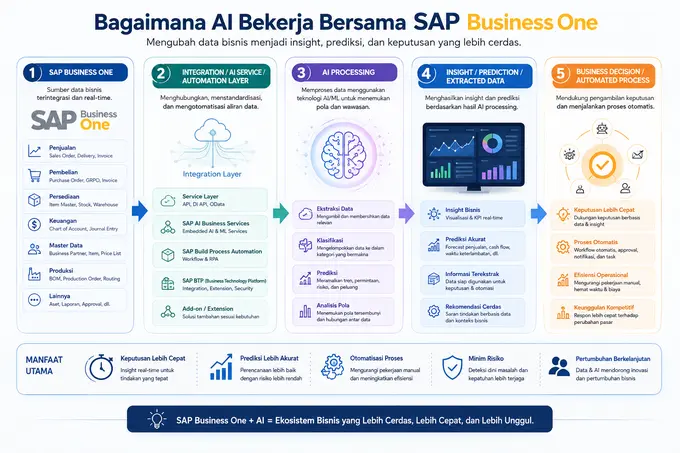
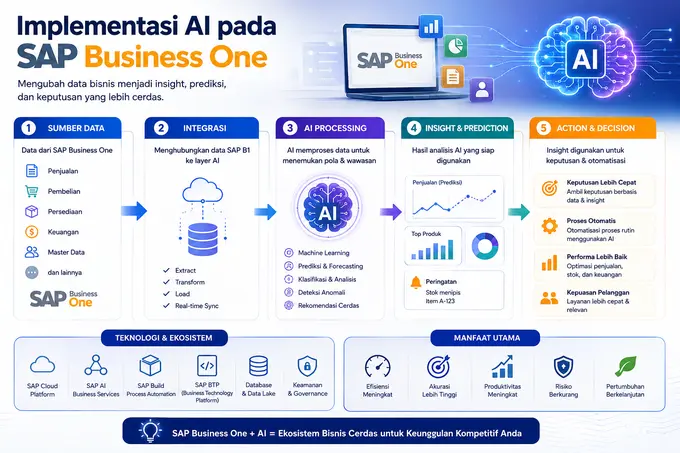
Conceptually, the AI workflow together with SAP Business One can be illustrated as follows:
SAP Business One

↓

Business Data (Sales Order, Invoice, Item Master, etc.)

↓

Integration / AI Service / Automation Layer

(Service Layer, SAP AI Business Services, SAP Build Process Automation, SAP BTP, add-on)

↓

AI Processing (extraction, classification, prediction, pattern analysis)

↓

Insight / Prediction / Extracted Data

↓

Business Decision / Automated Process
The important point is: AI almost never “touches” SAP Business One directly without an intermediary. Data must be retrieved (for example, through the SAP Business One Service Layer/API), processed by AI services, and then the results are returned to SAP Business One or presented to users in the form of insights, document drafts, or recommended actions.
Examples of AI Use Cases for SAP Business One
The following table maps common use cases, the SAP Business One data involved, the role of AI, and the business benefits. The last column indicates whether the use case is generally available as a core/integrated capability or requires an additional add-on/integration.
| USE CASE | SAP B1 DATA | AI ROLE | BUSINESS BENEFIT | CATEGORY |
|---|---|---|---|---|
| Invoice Recognition | A/P Invoice, vendor documents | Recognizes invoice layouts and extracts invoice fields | Reduces manual input | Core / AI Business Services |
| Document Information Extraction | PO, invoice, delivery note | Converts scanned/PDF documents into structured data | Speeds up document processing | Core (integrated) + AI Business Services |
| Report Analysis | Financial Report, GL | Summarizes and highlights important patterns in reports | Faster analysis without opening multiple reports | SAP Analytics Cloud / add-on |
| Sales Analysis | Sales Order, A/R Invoice | Identifies sales trends and segmentation | More targeted sales strategies | Analytics / add-on |
| Forecasting | Historical Sales Order | Predicts demand based on historical patterns | More accurate planning | SAP Analytics Cloud (Smart Predict) / add-on |
| Inventory Prediction | Item Master, Inventory | Predicts stock requirements | Reduces stockouts/overstock | Add-on / external integration |
| Anomaly Detection | Journal Entry, Payment | Detects transactions that deviate from normal patterns | Supports internal controls | Add-on / custom integration |
| Customer Analysis | Business Partner, transactions | Groups customers based on behavior | Service personalization | Analytics / add-on |
| Procurement Automation | Purchase Order, GRPO | Classifies and matches purchasing documents | Faster procurement processes | SAP Build Process Automation / add-on |
| Workflow Automation | Approval, internal documents | Executes condition-based rules and RPA | Reduces approval bottlenecks | SAP Build Process Automation |
Note that only a small portion (especially Document Information Extraction for the Order to Cash and Procure to Pay areas) has official integration points within the SAP Business One core. The rest falls within the realm of SAP Analytics Cloud, SAP Build Process Automation, SAP BTP, partner add-ons, or custom development.
AI for Order to Cash
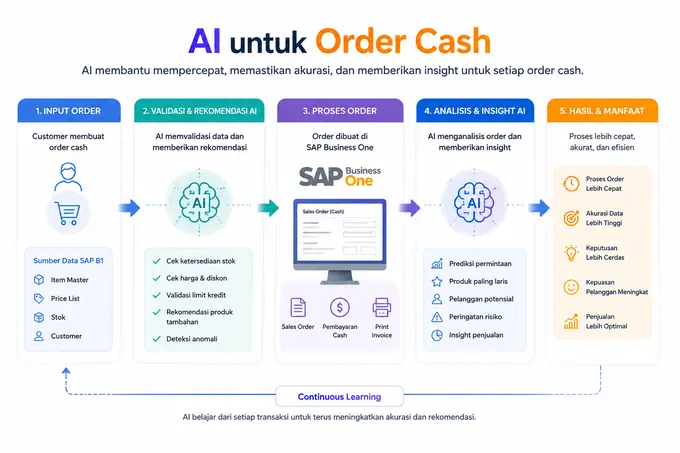
The basic Order to Cash flow in SAP Business One:
Sales Order → Delivery → A/R Invoice → Incoming Payment
At each stage, AI can act as an additional layer rather than replacing the SAP Business One process itself:
- Anomaly detection — flags Sales Orders with unusual pricing or quantity patterns compared with the history of the same customer.
- Sales analysis — identifies products or customer segments with the fastest growth as well as those beginning to slow down.
- Delivery analysis — identifies patterns of delivery delays based on the history of specific routes, warehouses, or customers.
- Payment prediction — estimates the likelihood of payment delays based on the historical behavior of Business Partners, allowing the finance team to collect payments more proactively.
- Customer insight — summarizes customer purchasing patterns to support retention strategies.
All of the examples above require an analytics or AI service layer outside standard SAP Business One transactions — either through SAP Analytics Cloud, third-party add-ons, or data-driven development using data retrieved through the Service Layer.
AI for Procure to Pay
The basic Procure to Pay flow:
Purchase Order → GRPO → A/P Invoice → Outgoing Payment
This area is one of the most mature AI use cases for SAP Business One because SAP itself has already directed Document Information Extraction toward this process. Some possibilities include:
- Invoice extraction — extracts invoice numbers, dates, amounts, and line details from vendor documents (PDF/scan) into an A/P Invoice draft.
- Document classification — automatically categorizes incoming documents (invoices, delivery notes, contracts) before further processing.
- Matching — matches Purchase Orders, GRPOs, and A/P Invoices to detect discrepancies before the document is posted.
- Anomaly detection — flags invoices with unusual amounts or vendors.
- Procurement analysis — analyzes purchasing patterns for price negotiations or vendor consolidation.
- Workflow automation — routes documents to the appropriate approval process using SAP Build Process Automation.
It is important to note that the AI extraction results in this area are in practice still presented as a draft that needs to be reviewed by a human before being posted to SAP Business One — not directly becoming a final transaction without oversight.
AI for Financial Analysis
Financial data in SAP Business One — General Ledger, Journal Entry, Accounts Receivable, Accounts Payable, and Financial Reports — is one of the richest data sources for AI. Some areas where AI can help include:
- Reading historical cash flow patterns to support short-term cash flow projections.
- Highlighting significant changes in profitability ratios compared with previous periods.
- Helping detect unusual journal entries as part of internal controls (not as a replacement for an audit).
- Summarizing lengthy financial reports into points that are easier for non-finance management to read.
These capabilities are generally delivered through SAP Analytics Cloud connected to SAP Business One, or through third-party analytics add-ons — not as built-in features on SAP Business One transaction screens.
Their function is decision support: AI helps people identify patterns more quickly, but the final decision and responsibility remain with the user and the applicable approval process.
AI vs Automation vs Business Intelligence
These three terms are often considered the same, even though they have different functions and complement one another within the SAP Business One ecosystem.
| TECHNOLOGY | FUNCTION | EXAMPLE IN SAP BUSINESS ONE |
|---|---|---|
| Automation (including RPA) | Executes repetitive tasks based on fixed rules, without needing to “understand” the content. | An RPA bot that copies data from email into a document draft using SAP Build Process Automation |
| Business Intelligence (BI) / Analytics | Processes historical data into reports and visualizations for people to read. | Monthly sales dashboard using Crystal Reports or SAP Analytics Cloud |
| Artificial Intelligence (AI) | Recognizes patterns, extracts information from unstructured data, or makes predictions from data. | Document Information Extraction reads vendor invoices and converts them into structured data |
Automation is not AI — automation can operate entirely using if-then rules without any machine learning model at all. BI is not AI — BI presents data based on queries and aggregations rather than predicting or “understanding” new patterns.
AI often complements both: AI can become an input for automation (for example, document extraction results trigger an approval workflow), and AI can enrich BI with predictive capabilities (such as machine learning-based forecasting in SAP Analytics Cloud).
What Are the Benefits of AI for SAP Business One Users?
- Reduces repetitive work such as manual document data entry.
- Speeds up report analysis processes that previously took hours.
- Reduces human error in high-volume data entry processes.
- Improves visibility into business conditions in real time.
- Helps detect transaction anomalies that can easily be overlooked manually.
- Accelerates data-driven decision-making rather than decisions based on assumptions.
- Improves the productivity of finance, sales, and procurement teams simultaneously.
What Are the Risks of Using AI with SAP Business One?
This section is often overlooked in promotional articles, even though it is crucial for responsible decision-making.
- Data quality — AI is only as good as the data it processes. Inconsistent SAP Business One data (duplicate Item Masters, non-standardized Business Partners) will reduce the accuracy of AI results.
- Hallucination / interpretation errors — particularly with Generative AI, results can appear convincing even when they are incorrect, especially when the data context is incomplete.
- Data security — AI processes involving external cloud services mean that company data moves outside the SAP Business One system; this must be evaluated from the perspective of compliance and internal policies.
- Access control — AI integrations need to be configured so that they do not provide broader access than necessary to sensitive data.
- Privacy — customer data and financial transactions require handling in accordance with applicable privacy regulations.
- Human oversight — AI results, especially for document extraction or decision recommendations, still require human review before becoming final transactions.
- Incorrect automation — automation triggered by incorrect AI results can amplify the impact of errors rather than reduce them.
- Dependency on external services — dependence on third-party AI services adds new points of failure that need to be monitored.
- Integration complexity — the more layers involved (BTP, add-ons, automation, AI services), the more complex the architecture becomes to manage and maintain.
AI does not replace internal control. Approval, segregation of duties, and audit trails that are already standard practices in SAP Business One must be maintained — AI functions as an assistance tool, not a final decision-maker operating without oversight.
Best Practices for Implementing AI in SAP Business One
- Identify repetitive processes that truly burden the team, rather than those that simply look technologically interesting.
- Ensure SAP Business One data quality before connecting it to any AI services.
- Define the use case specifically — for example, “reduce A/P Invoice data entry time”, rather than simply “use AI” in general.
- Determine whether the actual need is AI, automation, or analytics — many problems can be solved with simple automation without AI.
- Define the integration architecture — whether through the Service Layer, SAP BTP, SAP AI Business Services, or a partner add-on.
- Establish clear authorization for which data AI services are allowed to access.
- Establish human approval at critical points, especially before documents are posted to SAP Business One.
- Monitor AI results regularly to ensure accuracy remains consistent as data patterns change.
- Evaluate ROI — compare the time and costs saved with the licensing/implementation costs of the AI services being used.
Example Implementation Scenarios
Scenario 1 — Vendor Invoice Automation
Vendor invoice arrives via email → document is extracted using Document Information Extraction services → extracted data is validated → the system creates an A/P Invoice draft in SAP Business One → finance staff review it → the invoice is posted after approval.
Scenario 2 — Detecting Sales Orders at Risk of Delay
Management has thousands of active Sales Orders → data is analyzed using analytics/AI services connected to SAP Business One → the system identifies orders with patterns indicating a risk of delay based on delivery history and warehouse workload → management receives insights in the form of a priority list → the relevant team takes preventive action before a delay occurs.
The two scenarios above are conceptual illustrations. The technical components required — whether SAP Build Process Automation is sufficient, SAP AI Business Services are needed, or a custom add-on/integration is required — will depend on the architecture and specific solution selected by the company, as well as the SAP Business One version and licensing used.
Does Every Company Need to Use AI?
Not every SAP Business One user company needs to rush into adopting AI. Here is a simple framework for assessing readiness:
Consider AI if:
- Data and transaction volumes are high.
- Repetitive work consumes a significant amount of the team’s time.
- There are many incoming documents that need to be processed (invoices, POs, contracts).
- The company needs fast analysis for decision-making.
- There is already a clear business case — rather than simply following a trend.
AI may not be necessary if:
- Business processes are still simple and transaction volumes are low.
- Data in SAP Business One is not yet clean and standardized.
- Regular automation (rule-based, without AI) is already sufficient to solve the problem.
FAQ
What is AI in SAP Business One?
AI in the context of SAP Business One is an additional capability for extracting information from documents, analyzing data, and supporting business predictions based on data stored in the ERP, either through core integration or additional services.
Does SAP Business One already have AI?
Partially, particularly through Document Information Extraction integration for document processes in Order to Cash and Procure to Pay. Broader AI capabilities generally require SAP AI Business Services, SAP Build Process Automation, SAP BTP, or partner add-ons.
Is AI included in the SAP Business One license?
Not all of it. Some AI Business Services and SAP Build Process Automation services have their own pricing and licensing schemes outside the core SAP Business One license. Always confirm the current licensing scope with an official SAP partner.
Can SAP Business One be integrated with ChatGPT or other Generative AI?
Technically, it can be integrated through APIs/Service Layer and custom architectures or partner add-ons, but this is not a built-in SAP Business One feature and requires additional development/integration.
Can AI read invoices and enter their data into SAP Business One?
Yes, through Document Information Extraction services that extract data from documents into transaction drafts, which still need to be reviewed by a human before being posted.
Can AI analyze SAP Business One reports?
Yes, generally through SAP Analytics Cloud or analytics add-ons connected to SAP Business One, rather than directly from the standard SAP Business One report screens.
What is the difference between AI and automation in SAP Business One?
Automation executes repetitive tasks based on fixed rules, while AI adds the ability to recognize patterns, read unstructured documents, or make predictions. Both are often used together in a single process.
Is AI safe to use with ERP data such as SAP Business One?
Its security depends on the integration architecture, access policies, and data compliance measures implemented. AI does not replace internal controls, so human oversight and authorization must still be maintained.
Conclusion
SAP Business One + integrated data + automation + analytics + AI can create a much more intelligent ERP environment compared with conventional manual approaches.
However, building this environment is not about “activating AI”, but about choosing the right use case, ensuring data quality, designing the appropriate integration architecture (SAP Business One core, SAP AI Business Services, SAP Build Process Automation, SAP BTP, or partner add-ons), and maintaining governance and human oversight at every stage.
Companies that successfully adopt AI in SAP Business One are generally not those that are the fastest to try new technologies, but those that are the clearest about defining the business problems they want to solve.
Already have SAP Business One but still analyzing data manually? Explore the AI use cases that best fit your company’s business processes before determining the implementation architecture together with PT. Sterling Tulus Cemerlang.