



For many new users or accountants transitioning to SAP Business One (SAP B1), a common question often arises: “Why can’t I find Accounts Receivable or Accounts Payable directly in the G/L Account list when creating a Journal Entry?”
This issue frequently hinders manual adjustment processes, such as correcting opening balances or transferring balances between vendors or customers. In SAP Business One, financial data integrity is safeguarded through the Control Account mechanism, where direct posting to Accounts Receivable or Accounts Payable ledger accounts—without involving a Business Partner entity—is neither recommended nor, in many cases, permitted.
What is a Business Partner in SAP Business One?
Within the SAP Business One ecosystem, a Business Partner (BP) serves as a core entity encompassing Customers, Vendors, and Leads.
Unlike simpler accounting applications where transactions may be posted directly to an “Accounts Receivable” ledger, SAP B1 adopts a Sub-ledger architecture.
Every transaction involving a Business Partner is recorded under the respective BP profile while simultaneously flowing through the designated Control Account defined in the BP Master Data. This structure ensures that totals in the Aging Report remain consistently aligned with balances reflected in the Balance Sheet.
Using Business Partner in Journal Entry
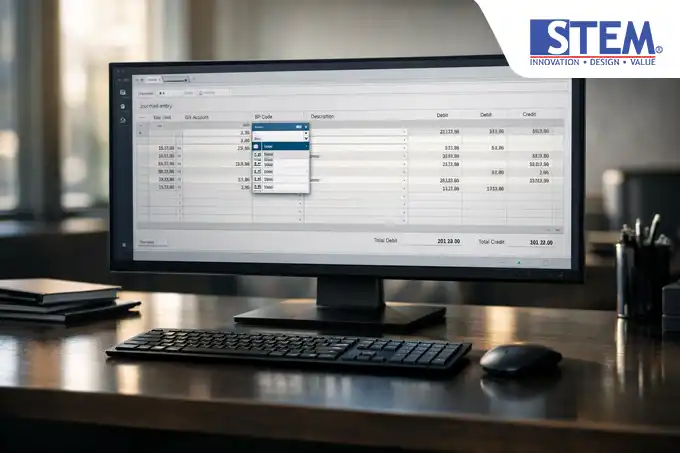
By default, the first column within the Journal Entry rows is labeled G/L Acct/BP Code. This is where SAP B1 demonstrates its flexibility.
- G/L Acct/BP Code Field: This polymorphic field accepts either a G/L account number or a Business Partner code.
- Business Partner Type Recognition: When a BP code is entered, SAP B1 automatically identifies whether it belongs to a Customer or Vendor.
- Direct Posting: By calling a BP code, the system posts to the sub-ledger, while SAP automatically references the associated control account (e.g., 110000 – Accounts Receivable) to update the General Ledger.
How to Use Business Partner in SAP B1 Journal Entry
Searching for a Business Partner in the Journal Entry form differs slightly from searching for a standard G/L account. Below are two commonly used technical approaches recommended by consultants:
Method 1: Using Ctrl + Tab (Highly Recommended)
- Navigate to Financials > Journal Entry.
- Place the cursor in the G/L Acct/BP Code column.
- Press Ctrl + Tab on your keyboard.
- The List of Business Partners window will appear. Select the desired BP.
- Note: Pressing the regular Tab key will only search within the G/L Accounts list.
Method 2: Right-Click Option
- Right-click on an empty row within the G/L Acct/BP Code column.
- Select List of Business Partners.
- Search by BP name or code, then click Choose.
When Should You Use Business Partner in Journal Entry?
Although most Business Partner transactions originate from the Purchasing or Sales modules, certain scenarios require direct BP usage in Journal Entries:
- Opening Balance: During initial implementation (Go-Live) to input receivable/payable balances per invoice.
- Balance Reclassification: Transferring balances from one vendor to another (e.g., vendor mergers).
- Receivable Write-Off: Writing off bad debts directly to expense accounts.
- Security Deposits: Recording vendor deposits outside the standard Purchase Order process.
Risks of Incorrect Business Partner Usage
As a Technical ERP Content Architect, I frequently encounter data inconsistencies resulting from improper input. The risks include:
- General Ledger vs Sub-ledger Discrepancies: Forcing postings to control accounts through G/L Accounts (if protections are disabled) alters Balance Sheet values while Aging reports remain unchanged.
- Broken Audit Trail: Auditors may struggle to trace transactions when receivable balances appear without identifiable Business Partner references.
- Tax Calculation Errors: Manual Journal Entries often bypass automated tax calculations available within marketing document modules.
Impact on Financial Reports
When you enter a BP Code in a Journal Entry, SAP B1 creates a dual impact:
| COMPONENT | IMPACT |
|---|---|
| Sub-ledger |
Balance in BP Master Data increases or decreases (affecting the Aging Report). |
| General Ledger |
Control Account balances (A/R or A/P) in the Balance Sheet are updated automatically. |
| Audit Trail |
Transactions are recorded as Origin: JE within Customer/Vendor Balance. |
SAP Business One Best Practices for Accountants

To maintain a clean, audit-ready SAP database, follow these best practices:
- Use Clear Remarks: Always complete the Remarks field in Journal Entry lines to clarify the purpose of manual BP transactions.
- Respect Control Accounts: Never disable the “Control Account” checkbox in the Chart of Accounts merely to simplify manual postings. Doing so compromises data integrity.
- Re-check BP Balance: After posting, immediately review the Business Partner Master Data balance to confirm accuracy.
Use Case Example: Balance Offset
Scenario: PT. Maju Jaya acts as both your Customer and Vendor. They agree to offset your payable of Rp 1,000,000 against their receivable.
- Open Journal Entry.
- Line 1: Enter Vendor BP Code, input Rp 1,000,000 in the Debit column (reducing payable).
- Line 2: Enter Customer BP Code, input Rp 1,000,000 in the Credit column (reducing receivable).
- Click Add.
- Result: Both payable and receivable balances are reduced simultaneously without cash or bank transactions.
FAQ (Frequently Asked Questions)
What is a Business Partner in SAP Business One?
A Business Partner represents external entities such as customers, vendors, or leads that conduct transactions with your company.
When should Business Partner be used in Journal Entry?
Use it when performing balance corrections, entering opening balances, or recording adjustments not tied to commercial documents such as invoices.
What is the difference between G/L Account and Business Partner?
G/L Accounts belong to the Chart of Accounts, whereas Business Partners function as sub-ledger entities whose transactions ultimately post to designated control accounts.
Does posting directly to BP affect reports?
Yes. Posting to Business Partners automatically updates both financial statements (Balance Sheet) and operational reports (Aging Report).
Conclusion
Mastering Business Partner Journal Entry is a fundamental yet critical competency for every SAP Business One user. By leveraging this functionality correctly—particularly using the Ctrl + Tab shortcut—you preserve financial accuracy and maintain a reliable audit trail.
Need assistance optimizing your Finance processes in SAP Business One?
Our consulting team at Sterling Tulus Cemerlang is ready to help you maximize SAP B1 for stronger internal controls. Contact us for further technical consultation.