


For a Finance Manager in a distribution or manufacturing company in Indonesia, the integrity of accounts receivable data is non-negotiable. Yet, operational realities often tell a very different story.
Imagine this scenario: the sales administration team hastily issues an A/R Credit Memo for returned goods, only to discover that the quantity is incorrect or the granted discount does not align with the original agreement.
To complicate matters further, the document has already been marked as Closed because it has been linked to a payment or internal reconciliation.
In manual systems or basic accounting applications, such corrections are frequently handled through manual “reversing journal entries” that ultimately sever the informational chain. As a result, during year-end audits, the finance team struggles to trace why certain customer receivable balances fail to correspond with the physical inventory in the warehouse.
This article explores in depth how to cancel a Closed A/R Credit Memo in SAP Business One without compromising the audit trail, as well as the implications for your business processes and financial reporting.
What is a Closed A/R Credit Memo in SAP Business One?
Functionally, an A/R Credit Memo is a document used to reduce customer receivables. This may arise from sales returns, price adjustments, or the granting of additional incentives after an invoice has been issued.
A Closed status on this document in SAP Business One signifies more than mere completion. It typically results from two primary conditions:
- Full Reconciliation: The credit memo amount has been fully allocated against one or more A/R Invoices.
- Cancellation Document: The document has been annulled through an official cancellation document (Cancellation Credit Memo).
Understanding this status is critical for the finance department, as any modification to a Closed document will automatically trigger adjustments in the General Ledger and other related modules.
Common Business Issues When a Credit Memo is Already Closed
In ERP implementation practices across Indonesia, we frequently encounter challenges that compel Finance Managers to cancel an A/R Credit Memo in SAP B1 or reverse a Credit Memo in SAP Business One. Some of the most prevalent issues include:
- Master Data Input Errors: Administrative staff select the wrong customer code or enter an incorrect VAT period, even though the document has already been linked to the relevant invoice.
- Return Value Discrepancies: Upon reinspection by the inventory department, the physical condition of returned goods does not match the value recorded in the issued Credit Memo.
- Double Posting: Duplicate entries occur due to inadequate coordination among staff, causing customer receivables to be reduced more than intended.
- Misallocation (Internal Reconciliation): The document has been erroneously settled against the wrong invoice through internal reconciliation, thereby obstructing the actual collection process.
Impact on Business Processes & Financial Statements
Correcting accounts receivable transactions in SAP is not merely a numerical adjustment. Every action carries a cascading effect on the company’s financial health:
- Cash Flow Accuracy: Errors in credit memos send misleading signals to incoming cash projections. You may believe receivables remain substantial when they have already been offset by an erroneous document.
- Profit and Loss Statement: Credit memos directly affect Sales Returns or Sales Discounts. If not properly cancelled, the Net Revenue reported in the income statement will be distorted.
- Revenue Recognition: For companies adhering to PSAK standards, revenue recognition is strictly regulated. Inaccurate document cancellation may result in revenue being recognized in the wrong accounting period.
- Product Profitability: If the credit memo relates to returned goods, both the Cost of Goods Sold (COGS) and inventory valuation in the balance sheet will be affected.
Solution Using SAP Business One
SAP Business One provides a structured mechanism to manage document cancellations without erasing transactional history. The system handles the cancellation of Closed A/R Credit Memos as follows:
1. Cancellation Mechanism
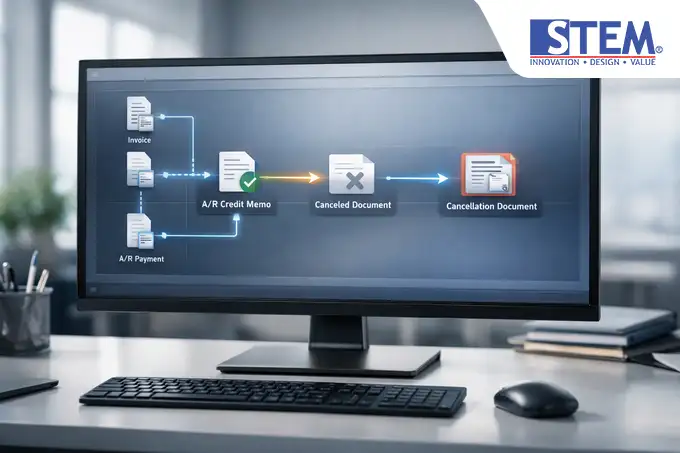
Rather than deleting the document, SAP generates a Cancellation A/R Credit Memo. The system automatically reverses the previous journal postings. If the original Credit Memo credited the receivables account and debited the returns account, the cancellation document performs the opposite entry.
2. Document Flow Integration
One of SAP’s core strengths lies in its financial document flow in SAP B1. Once cancellation is executed, the system updates the original document’s status to “Canceled,” and any referenced documents (such as previously offset invoices) are automatically reopened (Open). This ensures that no receivables remain suspended or unaccounted for.
3. Automated GL Posting
Each cancellation triggers an automatic Journal Entry. Finance Managers are no longer required to manually post adjustments for VAT or discounts. The system ensures that subsidiary ledger balances consistently align with those in the General Ledger.
4. Internal Reconciliation
If the document is marked as Closed due to prior reconciliation, SAP Business One provides a feature to first reverse the reconciliation before cancelling the primary document. This layered control safeguards against unintended data alterations.
Tangible Benefits for the Company

Implementing proper correction procedures delivers strategic advantages:
- Transparent Audit Trail: Both external and internal auditors value systems that record every cancellation. No figures vanish; each correction is supported by a documented reference.
- User Authorization & Control: Cancellation privileges can be restricted, requiring Finance Manager approval through the User Authorization feature.
- Risk Mitigation: Minimizes the risk of receivable data manipulation, as every change leaves a permanent digital footprint.
- Accurate Decision-Making: With real-time receivable data, management can make customer credit limit decisions with greater confidence.
Application Example in an Indonesian Company
Case Study: Consumer Goods Distribution Company
Before Implementation:
The company frequently experienced discrepancies between inventory and receivables. When Credit Memo errors occurred, finance staff merely recorded notes in Excel or posted manual journal entries in their legacy application.
Consequently, the Sales team often pursued collections from customers who had already processed returns—or conversely, failed to collect outstanding receivables because the system incorrectly reflected them as “Paid” due to erroneous credit memo entries.
After SAP Business One Implementation:
When errors are identified in a Closed Credit Memo, the Finance Manager simply uses the Cancel function. Customer receivables in the sub-ledger are automatically restored to their original value, and any previously reduced output VAT is systematically corrected.
The Sales team can view updated document statuses within the Relationship Map, enabling more professional and accurate customer communication.
Who Benefits Most from This Solution
This integrated document cancellation functionality is particularly vital for:
- Distribution Companies: With high frequencies of returns and price claims.
- Manufacturers: Regularly handling credit notes related to weight discrepancies or raw material quality issues.
- Retail/FMCG Businesses: Requiring rapid synchronization between warehouse data and daily financial reports.
If your company processes billions of rupiah in revenue with thousands of monthly transactions, control over Closed documents is no longer optional—it is essential.
Conclusion & Decision-Making Guidance
Managing transactional cancellations within fast-moving business operations presents a significant challenge for any Finance Manager. SAP Business One addresses this through a cancellation mechanism that preserves data integrity without sacrificing operational flexibility.
The key lies not merely in the system’s technical capability to cancel a Closed A/R Credit Memo in SAP Business One, but in how it enforces adherence to proper workflow best practices.
With a robust audit trail and seamless module integration, you can ensure that your financial statements faithfully reflect the true condition of your business.
Are your company’s transaction correction processes still manual and inherently high-risk? Ensuring that your ERP system is properly configured by experienced consultants is the first step toward stronger financial control.
Optimize your finance processes and accounts receivable control with the right SAP Business One configuration.
Discuss your SAP Business One requirements or obtain a complimentary consultation with the Sterling Team through our contact channels.